I tried and (dramatically) failed to learn machine code as a teenager, so ever since then I’ve generally avoided “coding” like the plague. But after a colleague mentioned it in passing, I decided take a brief look into “vibe coding”, which is building software entirely through natural language prompts to an AI. I thought that I might learn something about Edtech and possibly develop something that I could use in my classes.
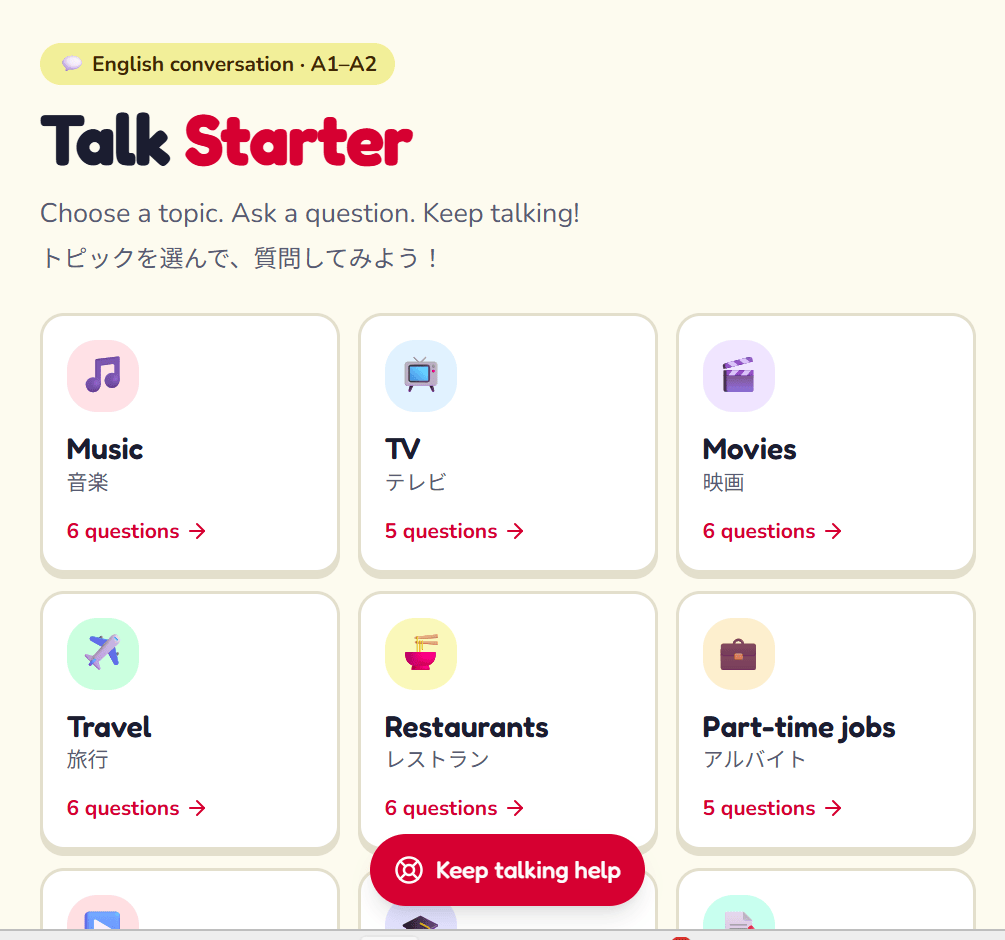
Not knowing where to start, I asked a couple of quick questions of Gemini, which has recently been a standard fixture in the top right hand side of my computer screen. Within a minute, it had generated a piece of code that could give learners in my writing class autonomy and support through topic choices and feeder sentences. I was absolutely stunned by the speed and efficacy of the code generation.
After signing up for Netlify, a free service that hosts the code, I was able to share the link with students in class and get them writing using it straight away.
Since then, I’ve built a few more apps to employ in my classes with a particular focus on choice and support. Having experimented with other ways and means of coding using tools such as ChatGPT and Canva too, I’ve found this approach remarkably flexible. For example, I (well, actually the AI) built a web app to ask students “What topic do you want to talk about?”) then give them some focused support (e.g., prompting them with starter questions). Clearly, the possibilities extend far beyond this, but this is a really interesting place to start.
Anyway, if someone like me (with an abject fear of coding) can create this kind of app in just a few minutes, then surely any educator with a bit of imagination and a few minutes to spare could do the same. Why don’t you give it a go?

